
Technology & Automation
Claim.MD Reviews: Pros, Cons, Pricing & Best Alternative
Read our Claim.MD review covering features, pricing, pros, cons, and user feedback, plus when VerifyTreatment may be a b...
Read the full article →


Patient verification automation helps healthcare teams reduce manual insurance checks across intake, VOBs, alerts, exports, and reverification. With VerifyTreatment, teams can capture patient details, run real-time VOBs, review coverage alerts, export clean verification records, and recheck active patients as coverage changes. Before automating, consider workflow fit, HIPAA compliance, user permissions, payer coverage, and reporting.
Patient verification is full of repeated tasks: checking eligibility, confirming benefits, reviewing payer details, checking authorization needs, and updating the right team.
Individually, these tasks may not feel like much. But they add up fast. According to an MGMA analysis, manually verifying one patient’s insurance eligibility takes about 12.64 minutes on average. For 40 patients, that is about 8.4 hours spent on eligibility checks alone, before adding portal logins, phone calls, fax follow-ups, manual rechecks, and internal handoffs.
When those checks move into an automated workflow, your team gets that time back for higher-value work like following up with inquiries, moving patients through intake, resolving exceptions, and supporting billing before claims go out.
A manual admission workflow usually looks like this: a patient is ready to move forward, but admissions still has to confirm coverage, check the payer portal, call the insurer, wait for a response, review the VOB, and pass the details to billing or the business office. Every step here matters. But when each one depends on manual follow-up, one delay can hold up the entire admission.
This is where patient verification software with real-time benefits verification makes a difference. Instead of waiting on every manual step to clear, your team can confirm coverage, review the details that matter, and keep intake moving while the patient is still ready.
What many teams don’t realize about denials in healthcare is that they often start from small front-end gaps that could have been caught earlier. It could be inactive coverage that was not rechecked, a payer mismatch that sends the claim to the wrong place, or an authorization requirement your team missed before care started.
By bringing verification into an automated workflow, your team can catch these issues earlier instead of finding out after a claim is delayed or denied. That gives you more time to fix coverage gaps, review payer risks, and address authorization needs before they become revenue problems.
Patient coverage does not always stay the same after the first check. Policies can terminate, Medicaid eligibility can change, managed care details can shift, and benefits can update before the next claim goes out.
The problem is that many teams still track these changes manually, patient by patient. Someone has to run the recheck, compare the result, update the record, and alert billing if anything changed. With dozens or hundreds of active patients, that process is easy to delay and easy to miss.
Automated batch reverification lets your team recheck coverage across your census on a schedule, so you can catch eligibility changes before they become billing problems.
If your admissions, billing, or RCM team is handling more patient verifications manually, the pressure shows quickly. More patients mean more portal checks, payer calls, VOBs to review, records to update, and more chances for details to slip through.
At first, your team may keep up by working faster. But as volume grows, manual verification becomes the bottleneck. Staff spend more time chasing coverage details than moving patients forward or handling exceptions.
Patient verification automation removes much of that repetitive work, so your team can process more verifications without turning every new patient into more admin pressure.
VerifyTreatment helps automate patient verification with tools for intake data capture, real-time VOB, coverage alerts, clean exports, and batch reverification.
Here’s how the workflow can run.
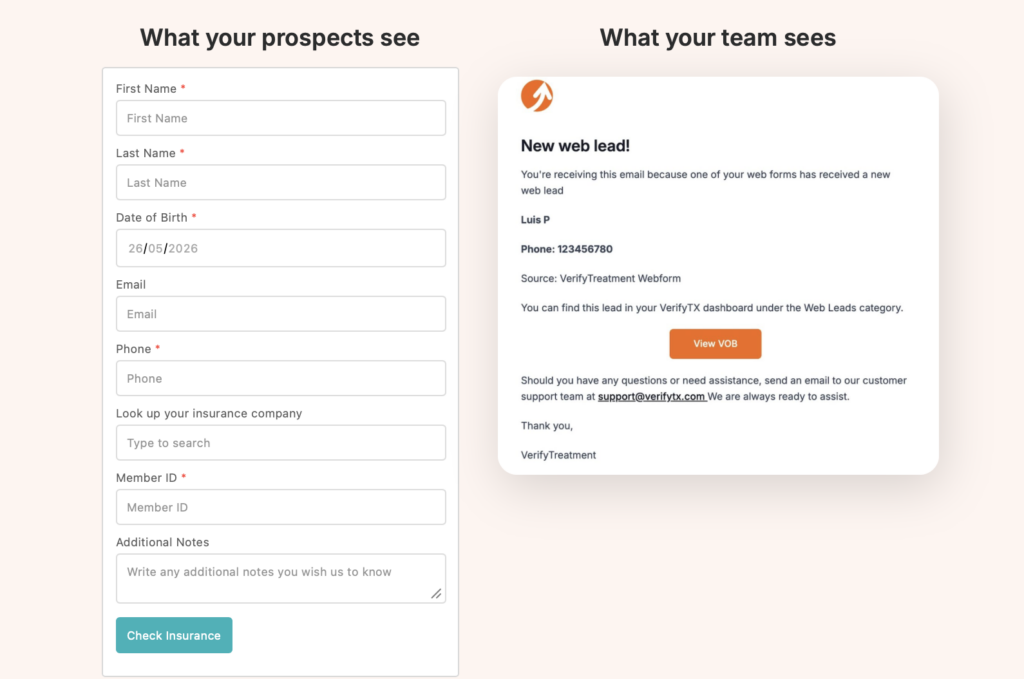
Customize VerifyTreatment’s patient intake webforms to collect the details your team needs to begin verification, such as:
You can place the form on your website, landing page, or campaign page, so that when a patient submits their details, eligibility can run immediately.
Your team can then see the verified status, reference number, timestamp, matched payer and plan, and relevant service types inside VerifyTreatment.
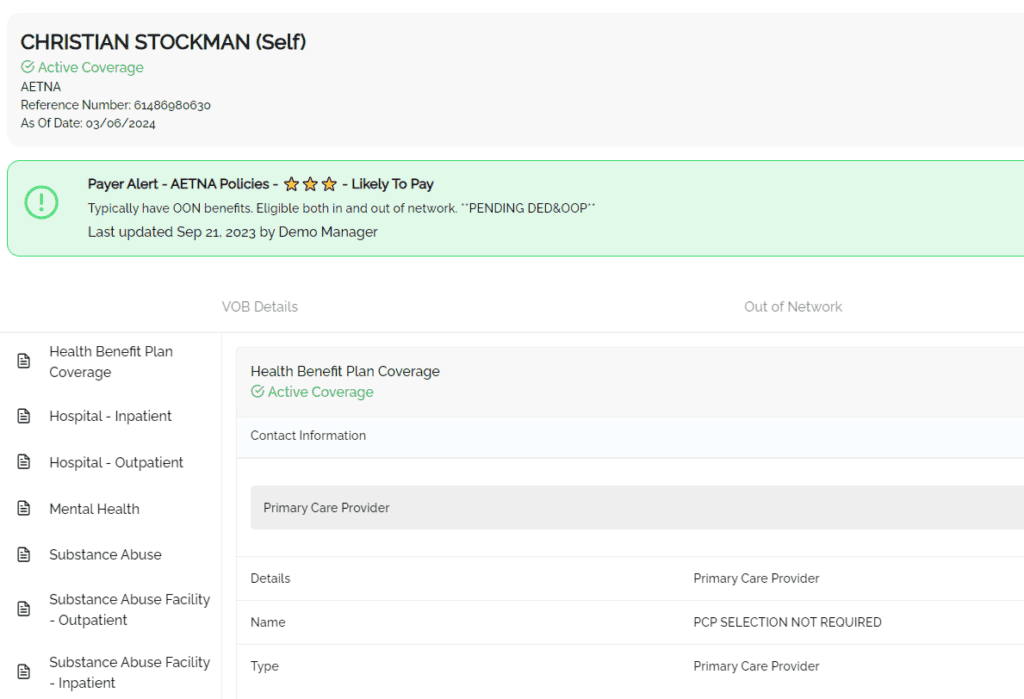
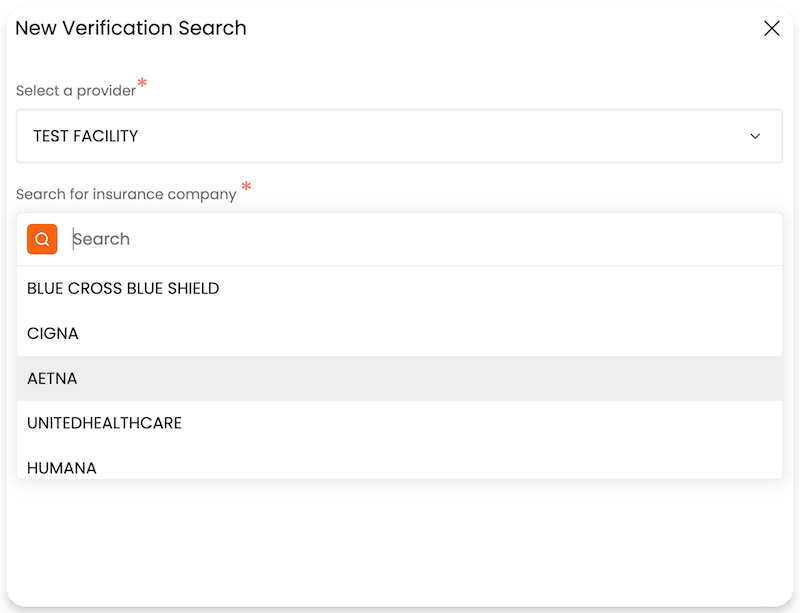
Once patient details are captured, start a new verification search in VerifyTreatment.
Select the provider from the dropdown, search for the insurance company, and enter the available insurance details needed to run the VOB.
This keeps the workflow moving from intake to verification without sending staff into separate payer portals or manual follow-ups too early.
After running the VOB, review the benefit details your team needs before admission moves forward, such as:
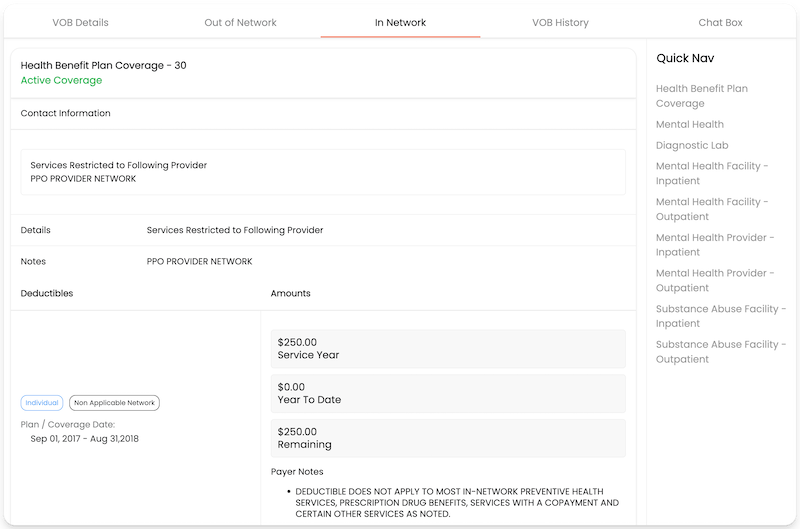
If the result is clear, admissions can continue. If something needs review, flag it before it becomes a billing issue.
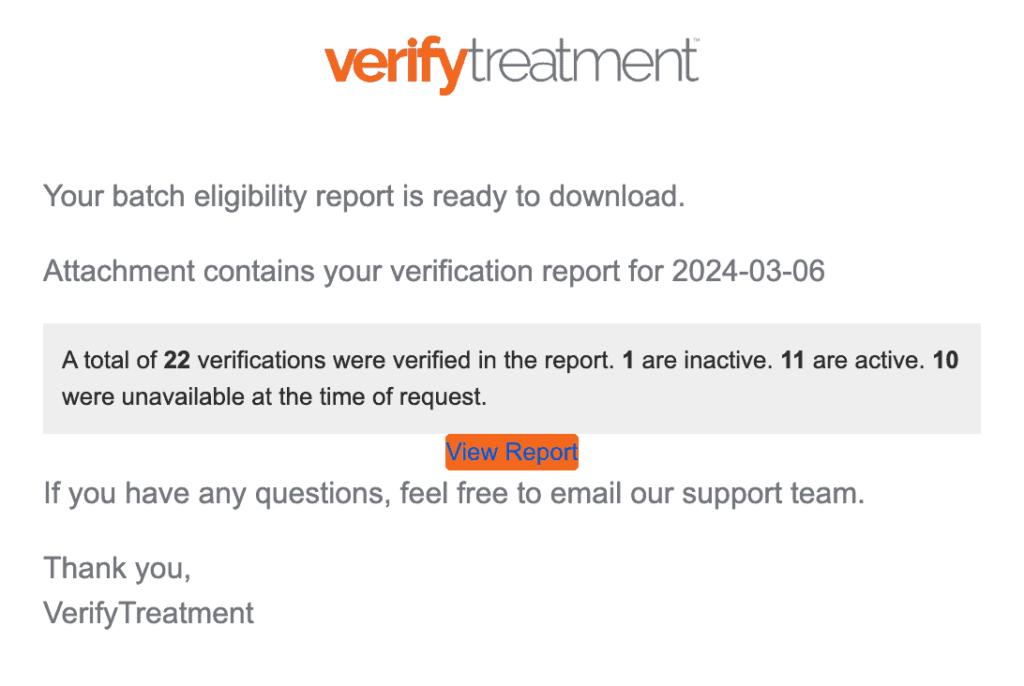
After running the VOB, review any alerts tied to the patient’s coverage before admission moves forward.
VerifyTreatment can alert admissions and RCM teams when coverage is inactive, pending termination, or missing required information. These are the kinds of issues that can easily turn into denials if they are only discovered after the claim is already moving through billing.
If an alert appears, assign it to the right team member and leave a short note on what needs review. For example: “Billing review needed. Coverage appears inactive.” Or: “RCM review needed. Policy may be pending termination.”
This keeps the issue visible inside the verification workflow, so your team can act before it becomes a claim problem.
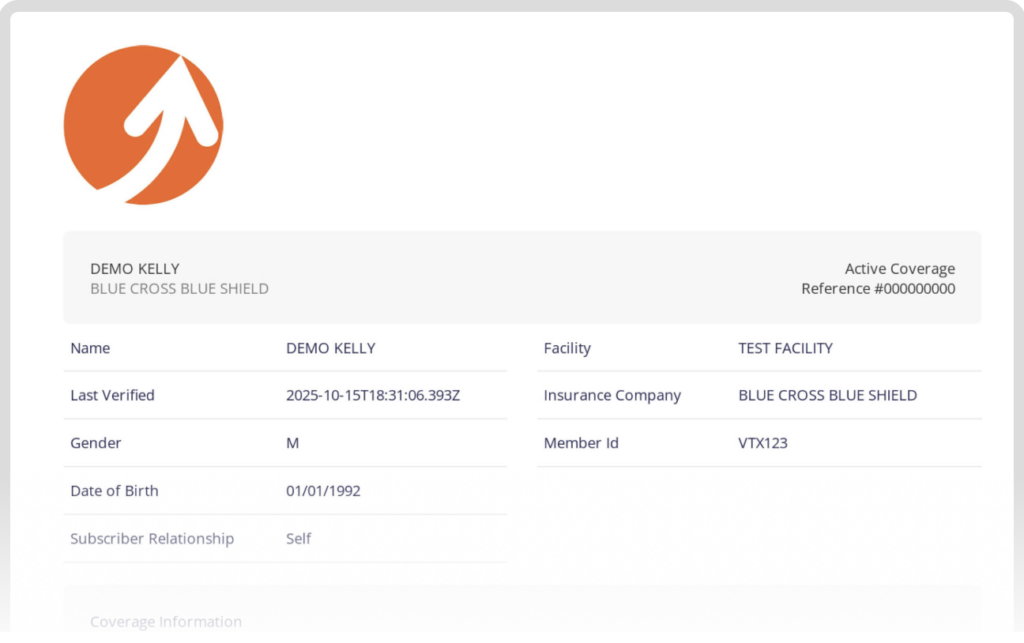
When billing, leadership, or another team needs a clean copy of the verification, generate anexport or branded PDF from VerifyTreatment.
This gives them the key VOB details in a consistent format, so they do not have to rely on scattered notes, screenshots, or manually copied benefit details.
You can choose the sections that matter, such as in-network benefits, out-of-network benefits, and relevant service types, then share the export for billing review, documentation, internal handoffs, or audit support.
Also, if the export needs to be shared, use the available security controls, such as role-based access, audit logs, link expiration, download tracking, and PHI-light summaries when only a coverage overview is needed.
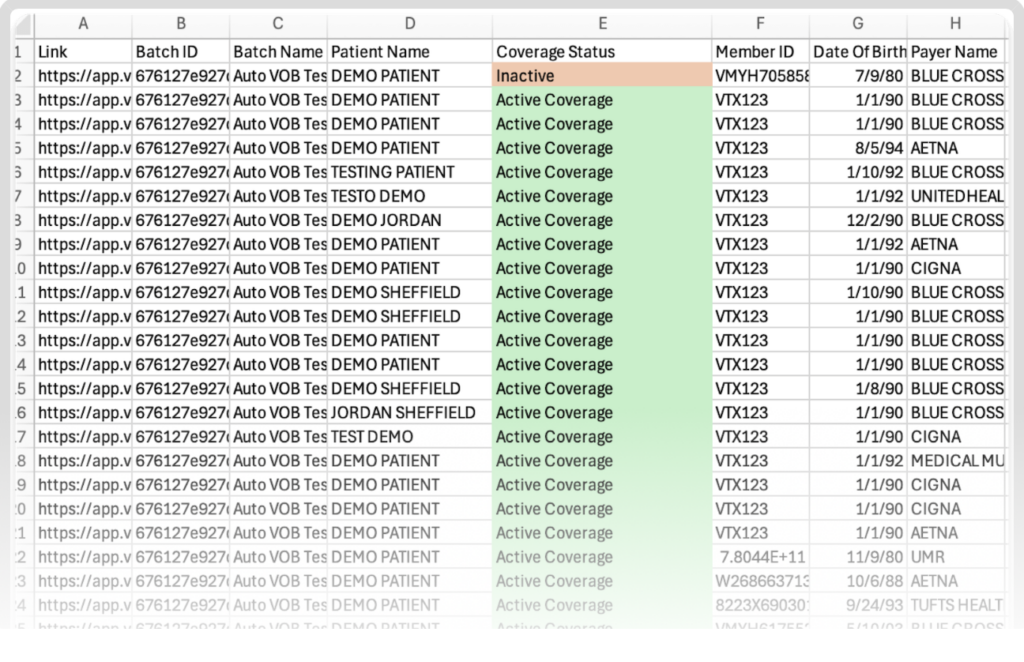
Verification should not stop after admission.
Coverage can terminate, Medicaid eligibility can change, managed care details can shift, and benefits can update before the next claim goes out.
Use VerifyTreatment’s Batch Verification to recheck active patients across your census on a schedule. Depending on your workflow, that could be weekly, monthly, before billing cycles, or on demand.
When a recheck shows a change, review what changed and decide what needs to happen next. From there, update the record, tag the right team member, and resolve the issue before billing submits the claim.
As your team uses VerifyTreatment, pay attention to the issues that keep coming up.
Maybe one payer often needs extra review. Maybe a certain plan creates authorization problems. Maybe some benefit types should always go to billing before admission. Or maybe handoffs keep breaking because the notes are not clear enough.
Instead of letting your team solve the same problem from scratch every time, turn those patterns into payer alerts, tags, notes, or review steps inside VerifyTreatment.
That way, the next person handling a similar verification already knows what to check, who to involve, and what to do next.
Just because patient verification automation can save your team a lot of manual work does not mean you should jump on any software that promises faster verification.
You still need to be sure the tool fits your workflow, protects patient data, supports the payers and benefit details you care about, and gives your team a clear record of what was verified.
Here are the main things to check.
First, check how the software fits into the way your team already works.
If admissions collects inquiries through webforms, Salesforce, a CRM, phone calls, or referrals, the verification process should connect to that flow as much as possible. Otherwise, your team may still end up copying details between systems, which brings manual work back into the process.
Automation should make your workflow cleaner, not give your staff another disconnected place to manage.
Patient verification involves sensitive patient, insurance, and financial information. So security is not something to assume.
Before using any tool, check whether it is HIPAA compliant, how patient data is stored, whether data is encrypted, and whether audit logs show who accessed or changed what. Also look at how exports, alerts, and shared files are handled. Faster verification is useful, but not if it creates new privacy or compliance risks.
Not everyone on your team should have the same level of access. Admissions may need to run verifications. Billing may need to review full VOB details. Leadership may only need visibility. But not everyone should be able to edit records, export files, or share patient information.
Set permissions early so each person can do their job without exposing more data than necessary.
Automation is only useful if the result is reliable enough for your team to act on. So check the payers the software supports, the benefit details it returns, and whether it gives enough information for the services you provide. This matters even more in behavioral health, where active coverage alone may not be enough.
Your team may also need mental health benefits, substance use benefits, carve-outs, visit limits, and authorization requirements. You do not want a tool that gives a basic eligibility answer when your team needs deeper coverage clarity.
Your team may need to go back and see what was verified, when it was verified, who ran the check, and what result came back. So make sure the software gives you clean records, timestamps, reference numbers, user history, exports, and audit logs. This matters for billing review, internal documentation, reconciliation, compliance checks, and leadership visibility.
Even if the software looks good, you still need to know what happens when something does not work as expected.
Before choosing a tool, check the kind of support your team gets during onboarding and after launch. Can they help your staff set up the workflow? Is there a knowledge base or training support? Can your team see payer status updates or know when a verification issue is from the payer side?
This matters because patient verification is too close to admissions and revenue to leave your team guessing. If a result is delayed, unclear, or not returning as expected, your team should know where to check and who to contact.
Patient verification should not be the part of your workflow that slows admissions down or leaves billing to clean up missing coverage details later.
VerifyTreatment gives your team a cleaner way to manage patient verification from intake to billing. Instead of jumping between payer portals, manual VOB follow-ups, and one-by-one reverification, your team can verify coverage, review key details, and keep patient information updated in one workflow.
If you’re ready to make patient verification easier to manage, book a demo with VerifyTreatment today.
Disclaimer: All trademarks, logos, and brand names are the property of their respective owners. The use of any third-party trademarks, logos, or brand names in this article is for informational and comparative purposes only, and constitutes nominative fair use. This article was published by VerifyTreatment, and while we strive for objective comparisons, VerifyTreatment is included as an option within this list.






Samantha is a dynamic marketing professional dedicated to making a difference in the behavioral health industry through her work at VerifyTreatment. With a strong background in digital marketing and brand advocacy, she helps elevate the platform’s presence by fostering authentic connections with treatment centers and healthcare providers. Her expertise in content creation and community engagement ensures that VerifyTreatment’s value is communicated effectively, helping centers streamline operations and improve patient care. Samantha’s focus on building trust and driving awareness positions VerifyTreatment as a key resource in the healthcare landscape.

Nicole is a versatile healthcare professional with a Bachelor’s degree in Health Administration and a solid background in managing healthcare systems and operations. Her experience spans healthcare management, compliance, and regulations, making her adept at navigating complex healthcare environments. In addition to her administrative expertise, Nicole holds certifications in Functional Nutrition and Personal Training, giving her a well-rounded perspective on health and wellness. She is committed to using her skills to improve healthcare settings and ensure effective, patient-centered care.

Tara is a dedicated leader who leverages her Master's degree in Information Technology (Florida Tech) and deep company knowledge (since 2018) to drive our community awareness. She is the central figure for managing social engagement and ensuring the community is immediately and effectively informed of all new product launches and company updates.

JoAnn has a strong background in the mental health and substance abuse industry, with expertise in billing, coding, facility credentialing, and contracting. She is passionate about team education and public speaking, always striving to make a positive impact. With a solid foundation in accounting, JoAnn also holds an Associate of Arts in Biblical Studies from Liberty University, blending her professional skills with her personal values.

For 11+ years, Melanie has been dedicated to helping clients access quality mental health care, with a special focus on grief, loss, and substance abuse. With expertise in healthcare, community outreach, patient advocacy, and leadership development, Melanie is passionate about making a positive impact in the lives of others.

Jordan is a dedicated advocate for behavioral health and is passionate about improving sales strategies and business processes. With a focus on helping businesses, particularly in healthcare, Jordan believes that streamlining operations is a way to positively impact more people indirectly. A strong leader, both personally and professionally, Jordan is committed to making a difference in the world by doing good business and serving a higher purpose.