Technology & Automation
Claim.MD Reviews: Pros, Cons, Pricing & Best Alternative
Read our Claim.MD review covering features, pricing, pros, cons, and user feedback, plus when VerifyTreatment may be a b...
Read the full article →


Office Ally is built for simple, reliable claim submission, while Availity focuses more on payer access and eligibility workflows. Both handle core billing tasks but still leave gaps around visibility, denials, and follow-up. VerifyTreatment addresses that gap by preventing errors before submission, reducing rework and improving clean claim rates.
Office Ally and Availity almost always come up when medical billing software is mentioned. Both are highly rated on review platforms like G2 and Capterra. But once you move into real-world usage and day-to-day billing workflows, you’ll notice things that typical feature lists don’t reveal.
For instance, while some Office Ally users highlight its simplicity, others say that when claims fail, the reasons aren’t always clear. On the other hand, Availity users have pointed out that they “cannot always find claims or payments,” making tracking and follow-up harder.
These aren’t issues you’ll see in feature comparisons, but they directly affect how smoothly your billing process runs and how quickly you get paid.
In this guide, we’ll compare how both tools actually perform in real workflows, covering ease of use, claim handling, pricing, and the challenges most reviews overlook.
At VerifyTreatment, we work closely with billing teams and revenue cycle operations that deal with these exact challenges every day, from eligibility issues to preventable claim denials and delays.
For example, we helped Foundation Recovery Network eliminate admissions delays, reduce staffing pressure, and prevent the loss of nearly 1 in 10 patients, resulting in over $10,000 per month in recovered revenue.
That means this comparison is grounded in real workflows, real bottlenecks, and real outcomes. Here’s what one of our customers had to say:

Great Product, Ease of Use, Added Efficiency for Our Team. Automating and bringing in health insurance verifications to our instance was a game changer. We have instant verifications for all of our prospects, as well as automated verifications for our clients on a weekly basis.
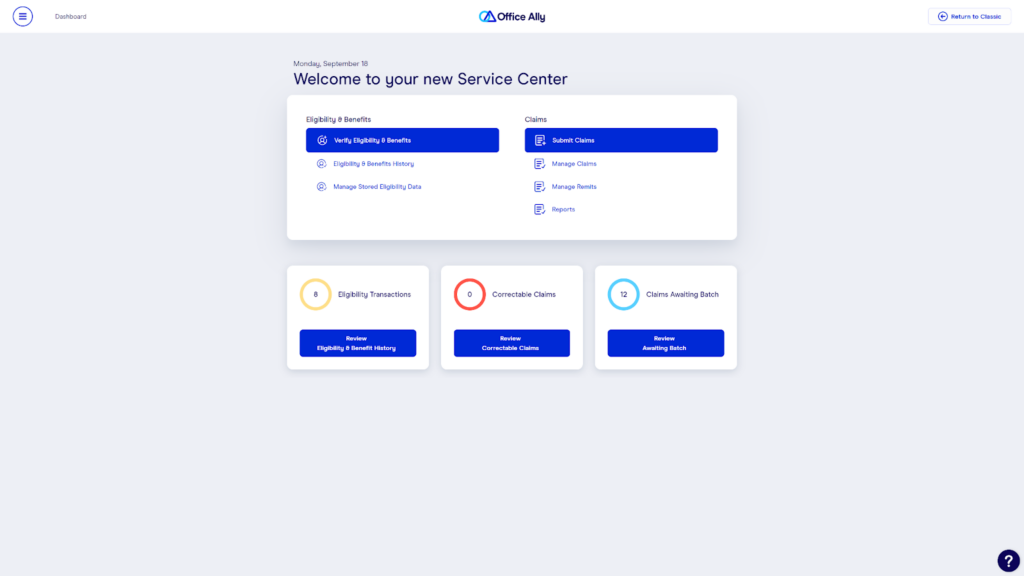
Office Ally is a web-based clearinghouse built primarily to handle one thing well: sending claims quickly and consistently.
It’s widely used by small to mid-sized practices because it keeps the process simple. You’re not dealing with too many moving parts. Just a straightforward system for creating, submitting, and tracking claims without needing a complex setup.
Office Ally’s pricing depends on whether your claims are submitted to participating (par) or non-participating payers:
This makes it appealing for smaller practices, but costs can increase depending on payer mix and volume.
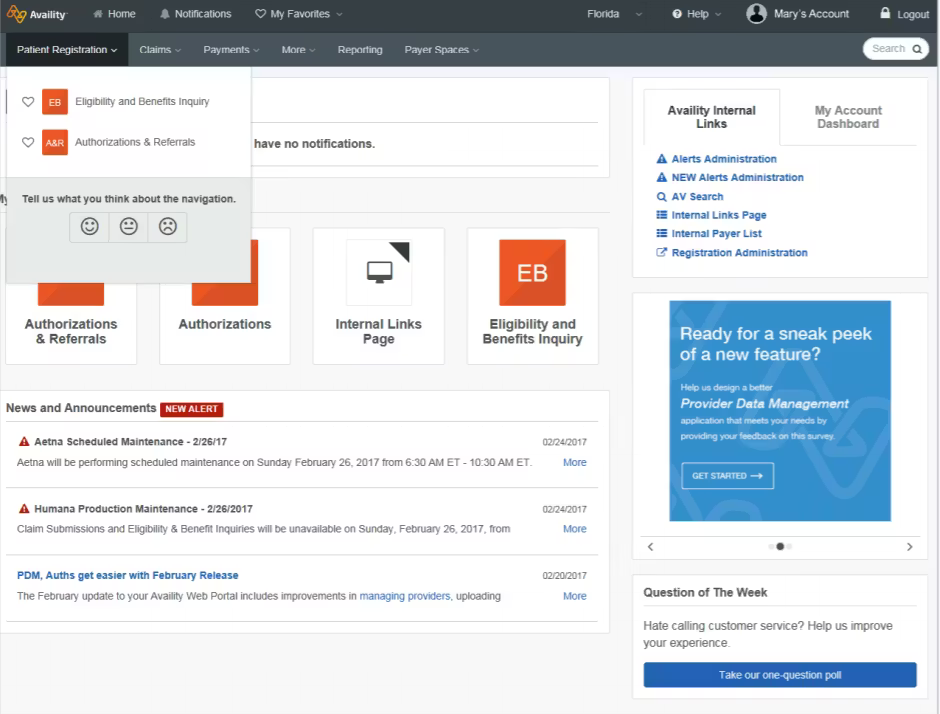
Availity is built around a different idea. Instead of focusing mainly on sending claims, it’s designed to act as a central hub for interacting with insurance payers, from eligibility checks to claim tracking and payment workflows.
That difference changes how you use it.
Rather than just pushing claims through a pipeline, you’re working inside a system that connects you directly to multiple payers, each with their own requirements, data, and processes. For practices dealing with a wide range of insurers, that kind of access can simplify certain parts of the workflow, especially on the front end.
Availity offers:
The challenge is that pricing beyond the free tier isn’t always transparent, which can make planning harder upfront.
If your main goal is to get claims out quickly and consistently, Office Ally feels more natural to work with.
It’s built around claim submission from the ground up. Its features include batch uploads, reusable templates, plus a fairly straightforward flow that doesn’t require jumping through multiple steps just to send a claim. For teams handling repeat visits or high volumes, that simplicity adds up fast. And it shows up in how users describe it:
“I love how Service Center by Office Ally is incredibly easy to use, which makes my workflow smoother, especially in billing insurance. The simplicity significantly reduces any hassle in navigation and ensures that my tasks are completed without unnecessary complexity.”
Now compare that to Availity.
Availity does support claim submission, but it’s not really the center of the experience. It’s built more as a payer interaction platform, so submitting a claim often depends on which payer you’re dealing with and how their workflow is structured inside the system.
That’s where things can start to feel less consistent. In fact, some users have pointed this out directly: “I recommend Office Ally over Availity as Availity’s batch submissions have never worked for me.”
That doesn’t mean Availity can’t submit claims. It absolutely can but the experience isn’t always as streamlined, especially when you’re dealing with multiple payers and different requirements.
Here’s a way to see it:
So if your priority is efficient, repeatable claim submission, Office Ally tends to have the edge here.
If you’ve ever had to check eligibility across multiple insurers, you already know how messy that can get. Different portals, different logins and different rules depending on the payer.
This is exactly where Availity starts to make more sense.
Instead of bouncing between systems, it pulls a lot of that into one place—eligibility checks, benefits, claim lookups—so you’re not constantly switching contexts just to confirm basic information.
And that’s not just a nice-to-have feature. It’s something people actively depend on: “The most effective benefit is being able to verify patients’ eligibility and benefits, as well as checking claims, all in one place. It allows access to multiple payers without needing separate logins.”
In fact, for some teams, that’s the main reason they use it at all: “We only use Availity to verify benefits and look up claims.”
Now compare that to Office Ally.
Yes, it can handle eligibility, but it doesn’t really change how you interact with payers. It’s still more of a supporting feature than something the workflow revolves around.
So while Office Ally works fine if eligibility isn’t a major part of your process, it doesn’t simplify that side of things in the same way.
You’d expect claim tracking to be straightforward: submit a claim, check its status, and know exactly what’s going on.
But in practice, how each tool handles that is very different.
With Office Ally, the experience is fairly simple. You can see when a claim is received, processed, and whether it’s been paid or rejected. It’s clean and easy to follow.
The problem is depth.
Once something goes wrong, the system doesn’t always give you enough detail to understand why, or what to fix next. Here’s a complaint from a G2 user;
“I find it challenging when claims don’t go through, as there is often insufficient explanation or support to address the issue. The error messages can be unclear, and it’s hard to understand what needs to be corrected.”
Now, Availity takes a different approach.
It gives you access to more data, especially from the payer side. You can look up claim statuses, check remittance information, and dig deeper into what’s happening across different insurers.
But that added access comes with a trade-off.
Instead of one clear view, the information can feel spread out depending on the payer and where you’re looking. So even though the data exists, it’s not always easy to piece together.
“You cannot always find claims or payments, which makes it difficult to track and resolve issues efficiently.” – G2 user
So here’s a way to see the difference;
And in both cases, you still end up doing extra work just to get a clear answer.
This isn’t something you notice immediately, but over time, it starts to matter.
With Office Ally, the workflow is relatively contained. You submit claims, check statuses, download remittances—all within a setup that’s fairly consistent. If it’s integrated with your EHR, even better. It becomes part of a single flow you can move through without thinking too much about it.
Now with Availity, the experience is a bit different.
It connects you to multiple payers, which is powerful, but it also means your workflow isn’t always in one place. You might check eligibility in one section, look up a claim in another, and follow a completely different path depending on the payer you’re dealing with.
So instead of one consistent flow, you’re navigating a set of connected, but separate experiences. That doesn’t make it worse across the board. In fact, for teams dealing with multiple insurers, that flexibility can be necessary.
VerifyTreatment solves a gap that both Office Ally and Availity don’t really address. It focuses on preventing the front-end issues that lead to denials, delays, and extra follow-up work later.
With it, you can catch errors early, validate requirements before sending claims, and reduce the amount of rework your team has to deal with later. So, instead of constantly fixing claims after submission, you’re sending cleaner claims from the start, and getting paid with fewer delays.
VerifyTreatment uses custom pricing, based on factors like practice size, claim volume, and workflow complexity. You’ll typically need a demo or consultation to get exact pricing.
| Feature | Office Ally | Availity | VerifyTreatment |
| Primary Role | Claim submission clearinghouse | Payer interaction & network platform | Front-end validation & denial prevention |
| Claim Submission (EDI) | Core strength (built for it) | Supported, but not primary focus | Not supported |
| Eligibility Verification | Available, limited scope | Strong multi-payer access | Built into validation workflow |
| Payer Access | Limited | Extensive payer network | Not a payer platform |
| Claim Tracking | Basic visibility | Broader but inconsistent | Focuses on pre-submission accuracy (less need for tracking issues) |
| Denial Handling | Minimal support | Limited guidance | Prevents many denials before they occur |
| Error Detection | Basic claim edits | Payer-dependent feedback | Proactive error detection before submission |
| Workflow Fit | Simple, linear workflow | Multi-step, payer-dependent | Adds structured front-end control |
| Automation (Front-End) | Limited | Limited | Strong (validation + intake workflows) |
| Best For | Fast, simple claim submission | Managing payer interactions & eligibility | Reducing denials and improving clean claim rates |
Tracking tools help you see what’s happening, but they don’t reduce the number of things going wrong. VerifyTreatment shifts that by catching issues before submission—so instead of tracking denials and fixing them later, there are simply fewer problems to deal with overall.
When claims are inconsistent, everything else becomes harder to manage. Payments get delayed, follow-ups increase, and revenue becomes less predictable. By tightening the front end, VerifyTreatment helps create a more stable flow, where fewer claims run into issues and outcomes become easier to anticipate.
Claims don’t fail randomly. They fail because something was off before submission—missing data, incomplete verification, or small errors that weren’t caught early. Once that becomes clear, the focus naturally shifts from reacting to problems to preventing them. That’s where VerifyTreatment fits in.
Choosing between Office Ally and Availity really comes down to what part of the workflow you’re trying to improve.
But as you’ve seen, most of the friction like denials, delays, repeated follow-ups, doesn’t start with submission or payer interaction.
It starts earlier. And once those issues make it into your claims, everything after becomes reactive. That’s where an alternative like VerifyTreatment fits differently. Instead of helping you manage problems later, it helps you avoid them in the first place by tightening the front end of your workflow.
So, if you’re looking to reduce avoidable denials, cut down on rework, and make your billing process more predictable. Take a look at how VerifyTreatment fits into your current setup here.
Disclaimer: All trademarks, logos, and brand names are the property of their respective owners. The use of any third-party trademarks, logos, or brand names in this article is for informational and comparative purposes only, and constitutes nominative fair use. This article was published by VerifyTreatment, and while we strive for objective comparisons, VerifyTreatment is included as an option within this list.





Samantha is a dynamic marketing professional dedicated to making a difference in the behavioral health industry through her work at VerifyTreatment. With a strong background in digital marketing and brand advocacy, she helps elevate the platform’s presence by fostering authentic connections with treatment centers and healthcare providers. Her expertise in content creation and community engagement ensures that VerifyTreatment’s value is communicated effectively, helping centers streamline operations and improve patient care. Samantha’s focus on building trust and driving awareness positions VerifyTreatment as a key resource in the healthcare landscape.

Nicole is a versatile healthcare professional with a Bachelor’s degree in Health Administration and a solid background in managing healthcare systems and operations. Her experience spans healthcare management, compliance, and regulations, making her adept at navigating complex healthcare environments. In addition to her administrative expertise, Nicole holds certifications in Functional Nutrition and Personal Training, giving her a well-rounded perspective on health and wellness. She is committed to using her skills to improve healthcare settings and ensure effective, patient-centered care.

Tara is a dedicated leader who leverages her Master's degree in Information Technology (Florida Tech) and deep company knowledge (since 2018) to drive our community awareness. She is the central figure for managing social engagement and ensuring the community is immediately and effectively informed of all new product launches and company updates.

JoAnn has a strong background in the mental health and substance abuse industry, with expertise in billing, coding, facility credentialing, and contracting. She is passionate about team education and public speaking, always striving to make a positive impact. With a solid foundation in accounting, JoAnn also holds an Associate of Arts in Biblical Studies from Liberty University, blending her professional skills with her personal values.

For 11+ years, Melanie has been dedicated to helping clients access quality mental health care, with a special focus on grief, loss, and substance abuse. With expertise in healthcare, community outreach, patient advocacy, and leadership development, Melanie is passionate about making a positive impact in the lives of others.

Jordan is a dedicated advocate for behavioral health and is passionate about improving sales strategies and business processes. With a focus on helping businesses, particularly in healthcare, Jordan believes that streamlining operations is a way to positively impact more people indirectly. A strong leader, both personally and professionally, Jordan is committed to making a difference in the world by doing good business and serving a higher purpose.